The Problem
Three things kill a job search: emotion, guessing, and time sinks
A job search is supposed to feel like a managed process. But in practice, it's usually four spreadsheets, a browser history as wide as Portland, an email inbox that doubles as a CRM, and a vague sense that you're doing it wrong.
The emotional blockers are real. You apply to a role that feels "maybe," spend a weekend on a custom resume, get ghosted for six weeks, and then rationalize that maybe it wasn't the right fit anyway. Multiplied across dozens of applications, this becomes noise. You can't see the patterns because there's no data — just feelings and rejection.
I needed something that removed the emotion and replaced it with structure. A system that forced a triage discipline before time was spent. That turned vague notions ("this role probably isn't great") into numbers ("Tier 2 applications convert at 0%"). That automated the repetitive parts (job board scraping, repetitive follow-ups) so the actual work — deciding which roles are worth pursuing — could be the focus.
The Approach
Treat the job search like a delivery project
Every client engagement has a pipeline: discovery, proposal, negotiation, delivery, close. A job search is the same structure, just reversed. Start with the opportunity (a job posting), classify it (Tier 1, 1.5, or 2), then move it through stages as signals arrive (recruiter outreach, screen, interview, offer, closed). The discipline is in the triage: if it's Tier 2, why spend custom-resume time on it?
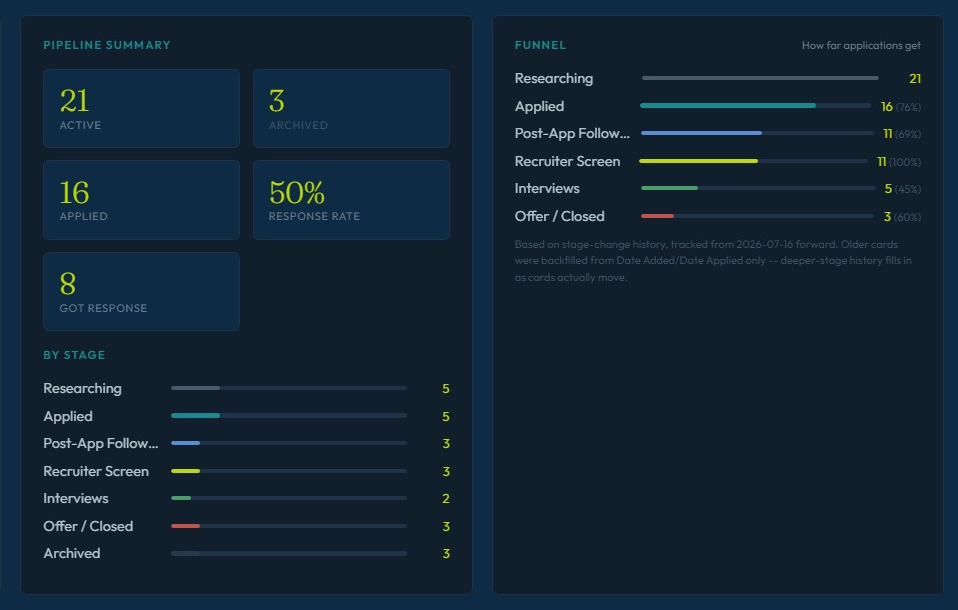
Analytics then closes the loop. If Tier 1 applications are converting at 20% but Tier 2 at 0%, the data tells you to stop applying to Tier 2. If recruiter screens are happening fastest for positions sourced from LinkedIn, maybe that's where the energy should go next. The job search becomes a conversation with data instead of a conversation with doubt.
What I Built
A single-file dashboard with five working views
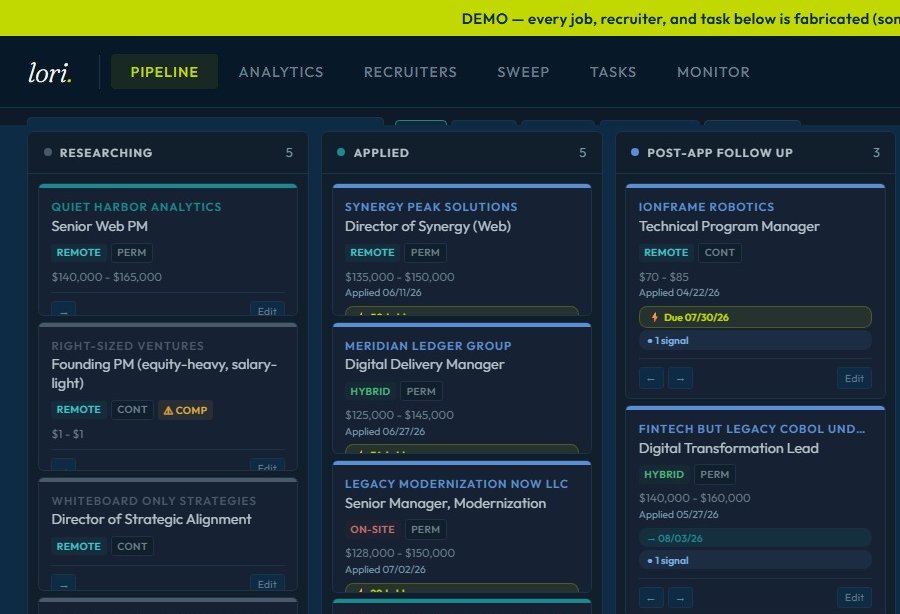
The Pipeline is a seven-stage kanban board: Researching → Applied → Follow-Up → Recruiter Screen → Interviews → Offer/Closed → Archived. Each role lives in exactly one stage at a time. Cards show company, role, Tier, and salary range. This is the visual center — where you can see at a glance what's stuck, what's moving, and what the volume actually is.
Analytics is the data layer. It computes four key metrics: (1) Response rate — what share of applied-to jobs reached at least a recruiter screen? (2) Tier signal rate — what percentage of Tier 1, 1.5, and 2 applications logged a positive event (recruiter outreach, interview, offer)? This is the metric that *actually* predicts success, not just "applied." (3) Funnel by source — which job boards / recruiter sources are producing interviews? (4) Time-to-first-contact — how long after applying do you hear back?
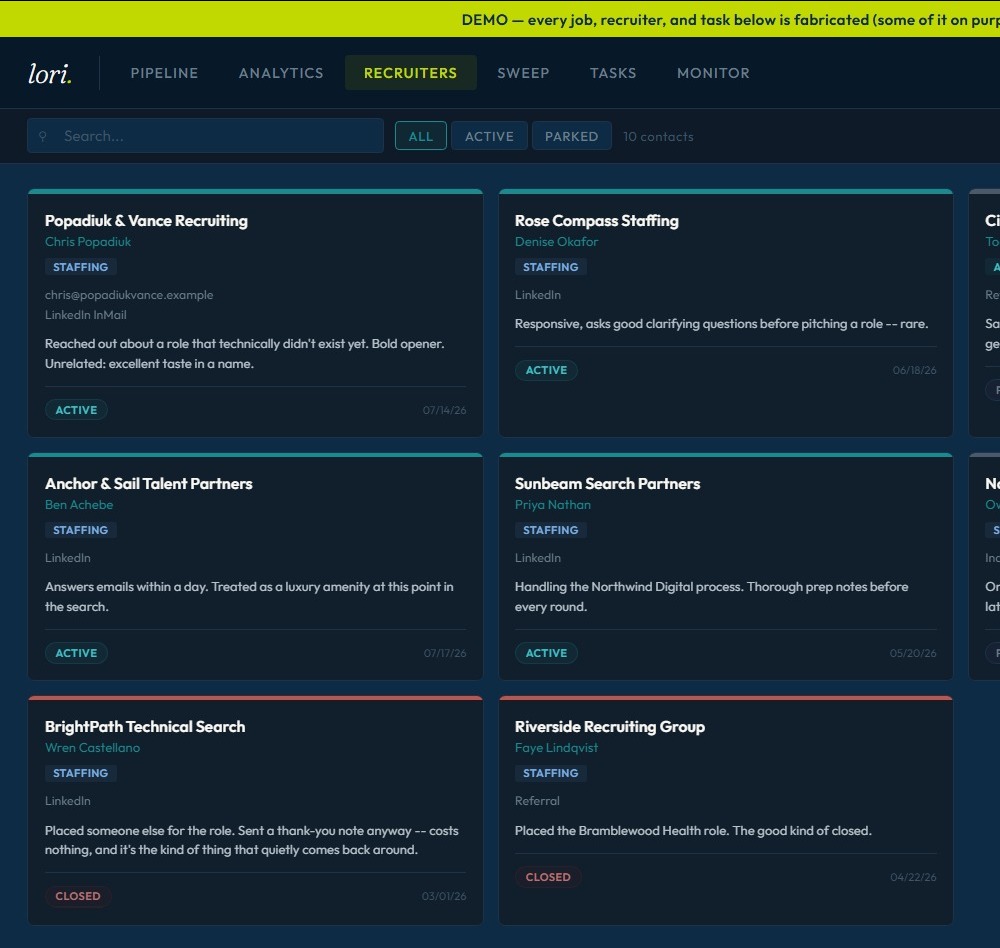
Recruiters is a lightweight CRM. Agency name, contact person, email, contact log, status (active/parked/closed), auto-linked to jobs by company name. It's thin by design — the recruiter data model is the next thing to strengthen, as recruiters are often the fastest path to a screen.
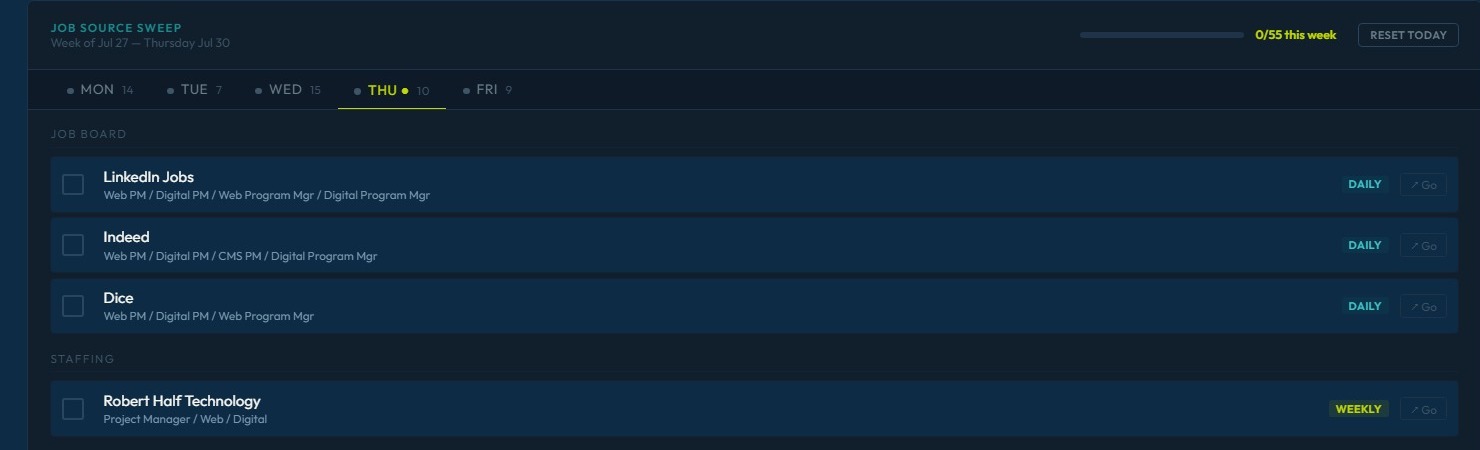
Sweep is the automation layer. It monitors roughly 50 job boards across three tiers of maturity: fully unattended API-based scraping (Greenhouse, Lever, Workable), browser-driven LinkedIn search, and a human-reviewed queue for boards with no API access. This runs daily and populates the pipeline, removing the time-sink of manual board checking.
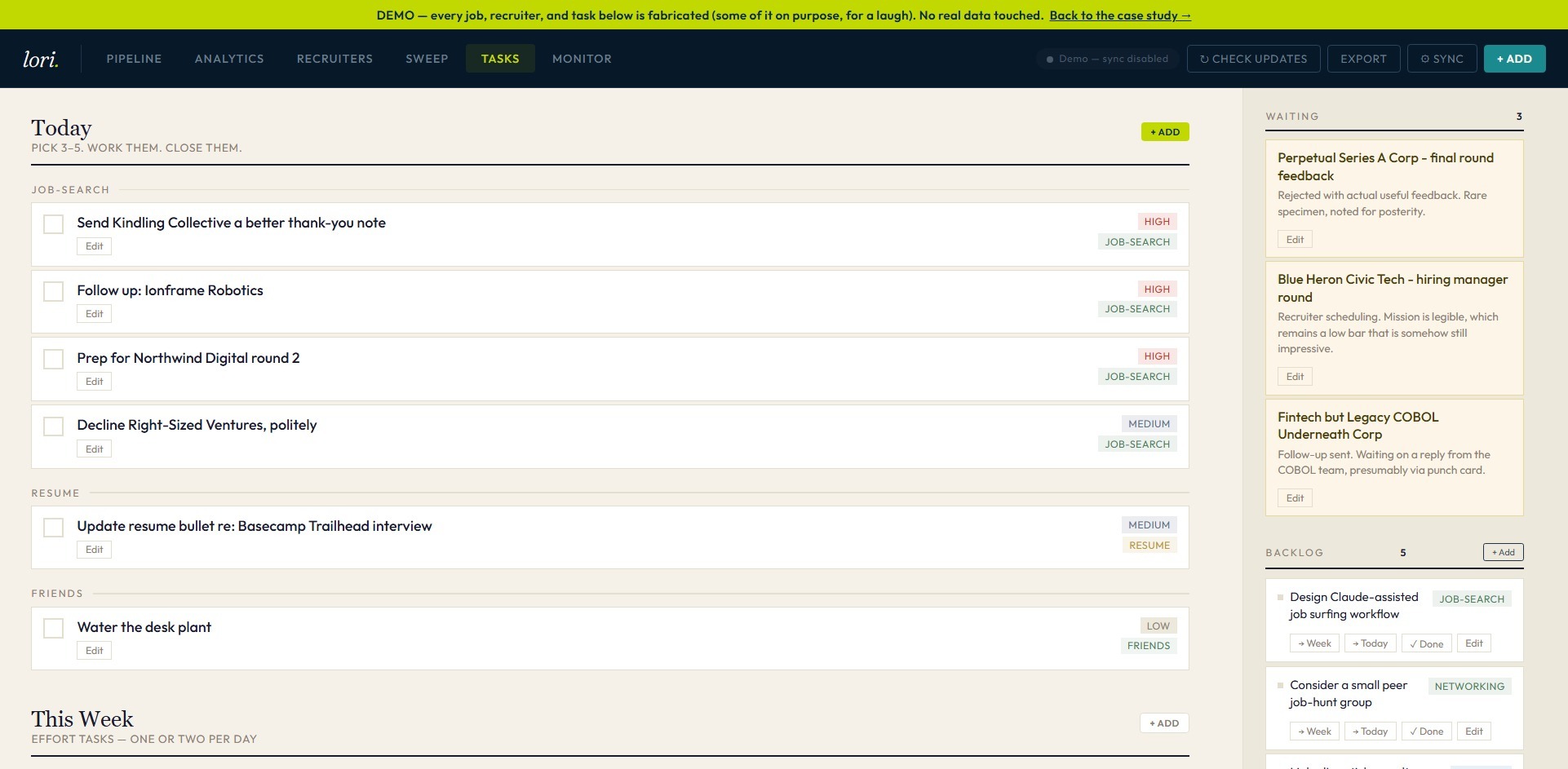
Tasks is a simple to-do system with day-rollover logic. Distinguishes between "apply to this role" (a one-time task) and "follow up with this recruiter" (a repeating one). Tracks completion rate so you can see how much you're actually accomplishing in a given week.
Visible Insight
Pipeline Clarity
You can see exactly where applications are stuck. "Recruiter Screen" is full? Time to follow up. "Interviews" is empty? Maybe the Tier 2 applications aren't the problem — maybe it's follow-up discipline.
Data-Driven Decision
Stop Guessing
Tier 2 converts at 0%. That's not a feeling — that's a fact. It changes behavior faster than any amount of self-doubt can.
Architecture
Why a single HTML file with GitHub sync
The entire app is one ~1,800-line HTML file. No framework, no build step, no backend server. On load, it checks the browser's localStorage for the working copy of jobs/recruiters; if that's empty, it fetches a data.json file from the repo and seeds from there. Saves write back to localStorage immediately. On demand, you can push an updated data.json to GitHub via the app's GitHub sync button — it talks directly to GitHub's REST API using a personal access token you paste once.
Why this stack? Zero hosting cost. Zero server maintenance. The data lives durably in GitHub, synced and versioned. The browser does all the compute. If I ever wanted to share this with someone else, the architecture would need to change — add a real backend, real auth, a database. But for a single-user tool, this is the right call: it's auditable (one file), it's portable (clone the repo, double-click the HTML, done), and it doesn't depend on any service staying up.
The Data
Proof points from six months of tracking
182 roles evaluated since January 2026. 103 currently active in the pipeline, 79 archived. 66 applications have moved past the "Researching" stage, with 47 of those reaching at least a recruiter screen, interview, or closed outcome. 14 recruiter relationships tracked, 6 currently active.
The tiering discipline shows up clearly in the conversion data:
Tier 1 Applications
Log a positive signal (recruiter outreach, screen, interview, or offer) at roughly 33% of the time.
Tier 2 Applications
Convert at 0% — no screens, no recruiter interest, no outcome other than silence.
That gap between tiers is the single most actionable insight the tool has produced: it turns "this role probably isn't worth my time" from a gut feeling into a number. And once it's a number, behavior change becomes obvious.
Lessons & Next Steps
What works. What's next.
The pipeline view and triage discipline are solid. The data is clean enough to make decisions from. The daily job-board automation works and has removed a genuine time-sink.
The gaps worth solving: recruiter management is the thinnest part. Right now status and contact history are logged manually — there's no computed responsiveness score, no automatic follow-up reminders, no pattern tracking on which agencies actually move roles forward. The analytics layer is descriptive ("you're converting Tier 1 at 20%") but not yet prescriptive ("stop doing X, do more of Y instead"). And the browser-driven automation pieces (LinkedIn search, the 44-source board sweep) require a human at the laptop — they can't run unattended like the API-based scrapers.
If I had unlimited time, the next build would be: (1) A computed recruiter responsiveness score pulled from the contact log, (2) an analytics layer that recommends what to do differently, and (3) a real backend so the sweep automations could run independent of any one person's laptop. But the core insight — treating a job search like a program, with pipeline discipline and data-driven triage — that's already proven.